
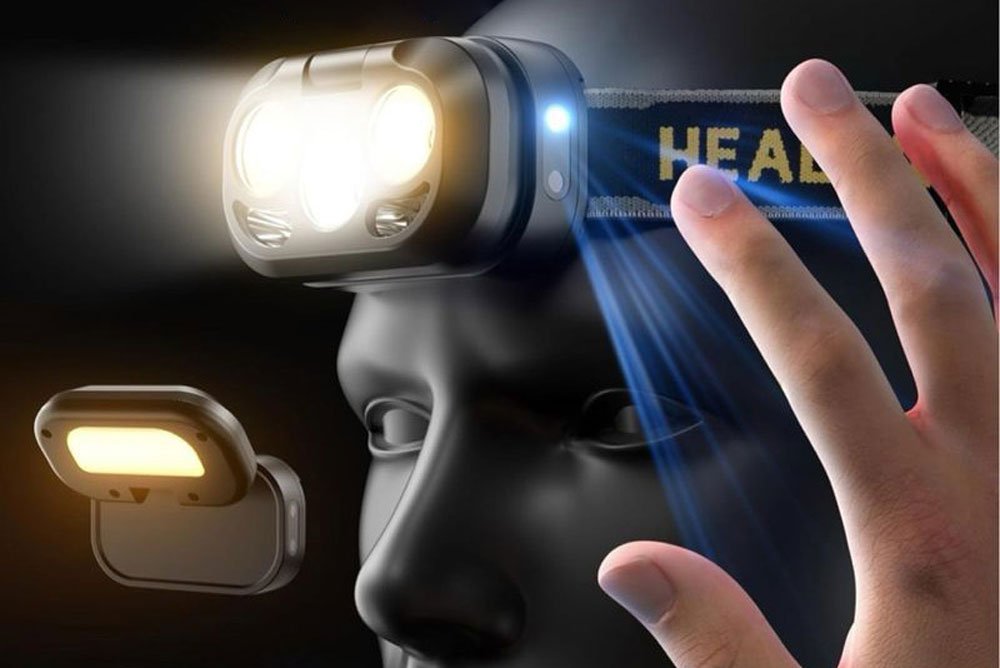
Are you struggling to understand how your headlamp motion sensor works? Many users find it confusing. I will explain this technology clearly from a Chinese manufacturer's perspective.
Headlamp motion sensor activation works using Infrared (IR) technology1. An IR emitter sends out invisible light. When your hand moves near it, the light reflects back to an IR receiver. A micro-controller unit (MCU)2 analyzes this reflection to turn the headlamp on or off.
This technology might sound very complex at first. You might think it requires expensive parts or magic. However, the real logic behind it is quite simple and very practical. Let us look closely at how this works inside the headlamp.
What is the exact working principle of this function?
Do you wonder what happens inside the headlamp when you wave your hand? It feels like magic. But it is just basic physics and smart coding.
The motion sensor uses three main parts. It has an IR Emitter3, an IR Receiver4, and an MCU. The emitter sends infrared light. The receiver catches the bounced light. The MCU reads the signal and decides if the light should change.
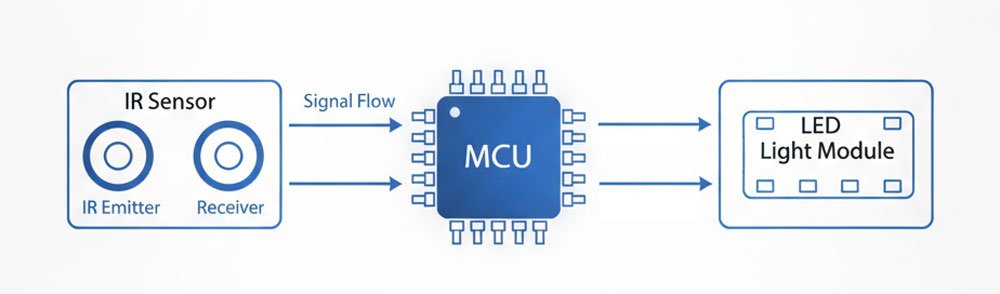
As a factory owner at Kovalite, I have seen many buyers ask about this. The MCU is the brain of the headlamp. It must read the infrared signals. It must make choices. It must tell the difference between a real hand wave and a falling leaf. We use our lab equipment in our factory to test these sensors. We want to make sure the MCU reads every signal correctly. We set specific rules in the MCU to avoid mistakes. Here is how the MCU understands different actions.
How the MCU Reads Different Signals
| Action Type | Signal Duration | MCU Decision | Lighting Result |
|---|---|---|---|
| Single Hand Wave | Less than 300ms | Real gesture | Turn light ON or OFF |
| Hand stops near sensor | 500ms to 2s | Possible blockage | No change |
| Fast double wave | Two peaks (200-500ms) | Double click | Change mode (e.g., Flood to Spot) |
| Fast shaking signal | Very short, unstable | Rain or bugs | No change |
| Long reflection | More than 3 seconds | Bag or pocket wall | No change |
The main job of the MCU is to sort these signals. A fast change means a hand wave. A slow change means something is blocking the sensor. A random change means rain or dust. Only a clear and fast hand wave curve will trigger the light. Some high-end headlamps use the double wave feature. But my B2B clients often tell me that end users find the double wave too hard to use. Therefore, we usually keep the design simple for our brand owners.
Why is this motion sensor function so practical for users?
Do you hate trying to find tiny buttons in the dark? Pressing buttons with dirty hands is frustrating. It can also ruin your expensive gear.
The motion sensor function is highly practical. It offers a true hands-free experience5. You just wave your hand gently in front of the headlamp. This is perfect when you wear thick gloves, have wet hands, or work with heavy tools.

In my 15 years in the lighting industry, I have talked to many professional buyers from Europe and North America. They always ask for features that make work easier. The core value of this function is hands-free operation. We supply portable lighting products to many large retailers. We know what these retailers want. We help many brands plan their product categories. We always suggest adding this feature for certain markets.
Real-World Use Cases
Different workers need this function for different reasons. Here is a breakdown of why our clients request this feature for their brands.
| User Scenario | The Problem | The Motion Sensor Solution |
|---|---|---|
| Search and Rescue (SAR)6 | Hands are busy with medical gear or ropes | Wave to control light without touching buttons |
| Industrial and Mining | Wearing thick safety gloves | Easy to turn on without taking off gloves |
| Car Repair | Hands are covered in oil and dirt | Keeps the headlamp clean and functional |
| Night Patrol | Hard to find buttons in total darkness | Fast activation with a simple hand movement |
When we help a new brand enter the market, we often suggest adding a motion sensor. It adds great value to the product. For example, one buyer wanted to sell to car mechanics7. We added this sensor. Their sales went up. The mechanic does not need to clean his hands to use the light. This small change makes a big difference in daily work. It shows how a factory and sourcing agent like us can help brands grow.
Why do most headlamps lack an automatic shut-off8 for the sensor?
Are you worried that the sensor will drain your battery? Many users fear their headlamp will die quickly. They think leaving the sensor on is bad.
Most headlamps do not have an automatic shut-off8 for the sensor. This is because the infrared module uses very little power. The MCU and IR parts use low-frequency monitoring. Leaving the sensor on for 24 hours only uses about 1% to 5% of the total battery.
A few years ago, many of my B2B clients asked us to design an automatic shut-off8 feature. They wanted the sensor to turn off by itself after a while. At first, we thought this was a great market need. Our company has dual genes. We act as a sourcing agent and a factory. We looked at market insights and factory costs. We put our R&D team to work in our factory. But after deep testing, we found this design was not necessary.
Power Consumption Breakdown
We tested the parts in our lab. Here is what we found about the power use.
| Component | Power Usage Level | Working Method |
|---|---|---|
| IR Emitter LED | 5 to 20 mA pulse current | Periodic pulse, not on all the time |
| IR Receiver | Microamps to a few milliamps | Reads reflected light only |
| MCU Brain | Very low power | Low-frequency monitoring |
This means the power loss is extremely small. If you leave the sensor on without the main light, it might lose 5% to 20% power over a whole week. Because the drain is so low, 90% of headlamps on the market keep the sensor running. Adding a complex shut-off timer would increase the cost for our buyers. It would not give much real benefit. We always aim to offer cost-effective solutions to our brand owners. We focus on reasonable performance and visually appealing quality.
Are there any solutions for users who need automatic shut-off8?
Do you still need a way to save every drop of battery? Some special jobs require strict power control. They need to prevent any sudden failures.
Yes, there are solutions for special needs like Search and Rescue. The most common solution is a long press on the button to turn off the sensor. Other solutions include smart designs where the sensor only works when the main light is on.
While most normal users do not need an automatic shut-off, some professional fields do. For example, Search and Rescue teams need their gear to hold power for a long time. They use headlamps as long-term backups. For these special cases, our factory offers a few custom solutions9. We provide different options based on the buyer budget and needs. Our extremely fast customized service takes only 7 to 15 days. We go from concept drafts to final confirmed samples very quickly.
Custom Solutions for Battery Saving
Here are the main choices we offer to our brand partners.
| Solution Type | How It Works | Pros and Cons |
|---|---|---|
| Long Press Button | User holds the button to turn off the sensor | Low cost, easy to control. Most popular choice. |
| Active Light Only | Sensor works only when the main light is on | Very smart, but development cost is higher. |
| Timeout System10 | Exits sensor mode after 1 hour of no movement | Very professional, but rare in the market. |
| Deep Sleep Mode | Sensor stays on but uses sub-milliamp power | Great balance, requires high-quality MCU. |
If you are a brand owner looking to build a new product, I usually suggest the Long Press Button. It is simple, cheap, and very effective. If your brand targets high-end rescue teams, we can build the Timeout System for you. At Kovalite, we can customize these features easily. We want to make sure your product perfectly fits your target market.
Conclusion
Headlamp motion sensors use simple infrared technology. They offer hands-free help and consume very little power. We help brands build smart, practical lighting tools for any job.
Understanding IR technology is crucial for grasping how motion sensors work, enhancing your knowledge of headlamp features. ↩
Explore the MCU's role in processing signals, which is key to the functionality of motion sensors. ↩
Learn about the role of the IR Emitter in motion sensors to appreciate the technology behind hands-free lighting. ↩
Discover how the IR Receiver works to enhance your understanding of headlamp motion sensors. ↩
Find out how hands-free operation improves usability, especially in challenging environments. ↩
Learn about the practical applications of motion sensors in critical situations like SAR operations. ↩
Learn how motion sensor technology improves efficiency and cleanliness for car mechanics. ↩
Explore the necessity and functionality of automatic shut-off features in headlamp technology. ↩
Learn about customization options that can enhance headlamp functionality for specific user needs. ↩
Explore how a Timeout System can optimize battery usage in professional headlamp applications. ↩